ESP32-S3 · hardware
Alma Tracker S3
The pocket edition of the Alma family. A minimalist pattern tracker that runs on an M5StickC S3 — two buttons, one wrist, four tracks — powered natively by the MusiKa engine.
Made to carry
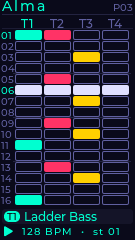
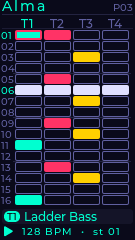
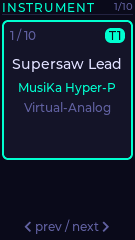
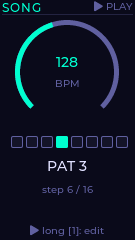
Four tracks, sixteen steps, classic vertical columns. Every track gets its own tint; a compact card shows the patch assigned to the selected track; the bottom strip shows transport, BPM and current step. Everything runs on the same MusiKa engine the desktop apps use.
Two buttons and a wrist
You drive Alma Tracker S3 with two physical buttons and the built-in accelerometer. Tilt the device to switch columns. Press to step. Long-press to change mode. When the sequencer is playing, you can wobble it like a theremin to shape the sound in real time.
Screens
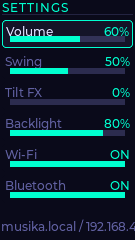
Every pixel below is a verbatim render from the same LVGL UI that ships to the device — captured via the built-in SDL simulator so they match the real 240 × 135 screen exactly.
Controls
Two buttons, one tilt axis, two gestures. Long-press holds for roughly 400 ms; combo means both buttons at the same instant.
| Gesture | Anywhere |
|---|---|
| 1 + 2 | Play / stop |
| 1 long | Toggle edit mode |
| 2 long | Next page |
| On the Tracker | 1 | 2 | Tilt ◀ | Tilt ▶ |
|---|---|---|---|---|
| Navigation | cursor up | cursor down | prev track | next track |
| Edit | toggle note | toggle note | — | — |
| On Settings | 1 | 2 |
|---|---|---|
| Navigation | prev field | next field |
| Edit (slider) | −5 | +5 |
| Edit (toggle) | flip · reboots | flip · reboots |
| Edit (long) | load song | save song |
Tilt FX
A single slider in Settings turns the device itself into a performance controller. When the sequencer is playing and Tilt FX depth is non-zero, the roll angle drives two MIDI-style continuous signals in real time:
- |roll| → CC 1 · mod wheel. Universal expression CC that patches internally route to filter cutoff, LFO depth or drive.
- roll → pitch bend · gentle symmetrical wobble, about ±2 semitones at full depth.
Messages are de-duplicated so only meaningful changes hit the audio core. Flat = clean; tilt either way = progressively wild.
While performing
Tilt is temporarily reassigned from track-switching to sound. Stop the transport or set Tilt FX back to 0 to navigate tracks again with the wrist.